Seed phrase scams try to persuade a wallet owner to reveal the backup voluntarily. The request may arrive through fake support, a cloned website, a malicious app, a browser extension, an airdrop, or an urgent security warning. The central rule is simple: legitimate wallet support will not ask for a seed phrase to inspect a transaction, update a device, or verify ownership.
Any request for the phrase is a stop signal
Do not continue the conversation, click another link, install software, share your screen, or “verify” the backup. Open the provider’s official website or app independently.
Fake customer support
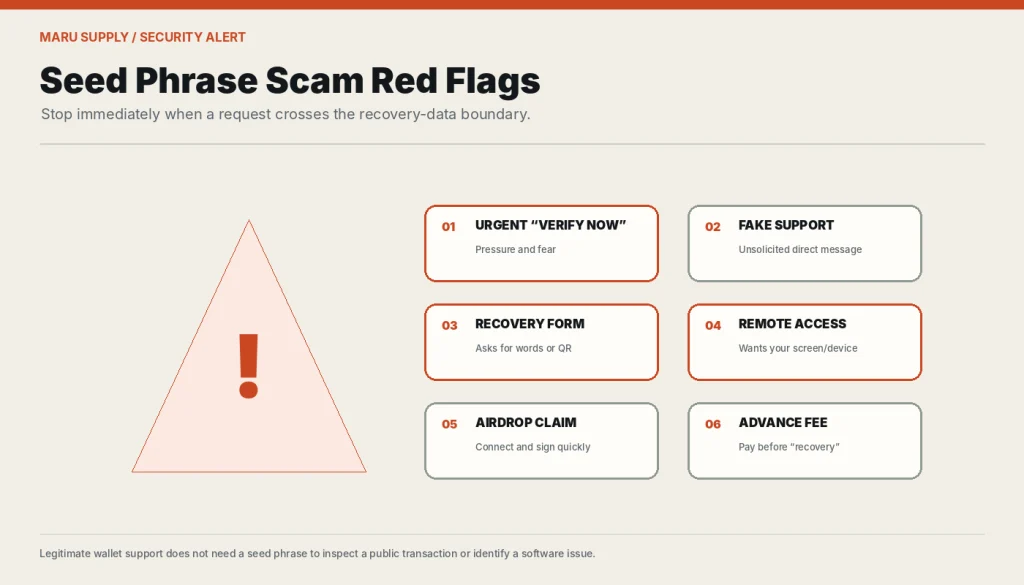
Scammers monitor social networks, forums, comments, and search results for people reporting wallet problems. They reply quickly, copy a brand’s logo, and move the conversation into direct messages.
- They claim the wallet must be “synchronized,” “validated,” or “reconnected.”
- They ask for the phrase, private key, QR code, wallet file, or remote access.
- They create urgency by saying funds are currently at risk.
- They send a link to a form that imitates an official recovery page.
- They promise a refund or recovery after a payment.
Phishing websites
A phishing page may closely resemble a real wallet interface. Domain names can differ by one character, use a deceptive subdomain, or appear in a sponsored search result. A professional appearance is not evidence of authenticity.
- Navigate from a saved verified bookmark or the official application.
- Inspect the full domain, not only the page title or logo.
- Avoid links sent in unsolicited messages.
- Be cautious when a site asks for recovery words before showing ordinary public information.
- Do not assume HTTPS means the operator is legitimate; it only protects the connection to that domain.
Malicious wallet apps and browser extensions
A fake app can copy a well-known name, buy ads, collect recovery words during “import,” or replace receiving addresses. Browser extensions are particularly sensitive because they operate inside the environment used for web transactions.
- Follow the official project website to its verified store listing or repository.
- Check the publisher, download history, permissions, release notes, and official announcement channels.
- Do not install multiple “recovery” extensions to troubleshoot one problem.
- Verify the destination address on a trusted display before confirming a transaction.
Fake airdrops, rewards, and wallet verification
A scam may claim that a wallet must be connected or verified to claim tokens, prevent suspension, or receive compensation. Some sites steal the seed phrase directly; others request a malicious transaction signature or token approval.
As explained in recovery-phrase security guidance, a seed phrase is a wallet backup—not a credential required to connect to a legitimate application. Even without asking for the phrase, a malicious site can request permissions that allow tokens to be moved. Read every transaction and approval rather than treating wallet connection as harmless.
Remote-access and screen-sharing scams
A scammer may ask the user to install remote-control software or share the screen while opening the wallet. This can expose words, passwords, QR codes, clipboard data, or transaction details.
Recovery-service scams
After a loss, victims are vulnerable to anyone claiming they can reverse transactions, retrieve a phrase from the blockchain, or hack the attacker. Some technical recovery work can be legitimate in narrow cases involving damaged files or partially known backups, but the service may require enough information to take the funds.
- Do not pay an advance fee based only on screenshots or testimonials.
- Do not send a complete seed phrase or private key.
- Demand a clear technical explanation of what is and is not possible.
- Verify the operator independently and consider legal advice for material losses.
- Assume that blockchain transactions cannot simply be “cancelled by support.”
What to do after revealing a seed phrase
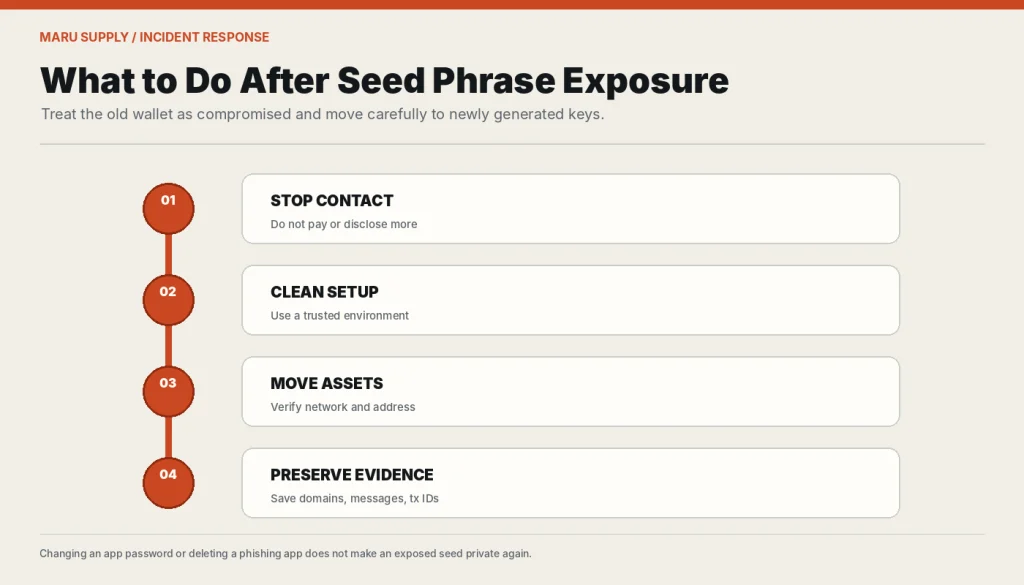
- Stop interacting with the scammer. Do not disclose more information or pay a “release” fee.
- Use a clean trusted environment. Create a new wallet with newly generated secret material.
- Move remaining assets. Verify networks, addresses, fees, token approvals, and account branches.
- Do not reuse the old phrase. A new device does not make exposed keys private again.
- Preserve evidence. Save transaction IDs, domains, messages, accounts, and payment records without keeping malicious software installed.
- Report through appropriate channels. Contact relevant custodial services, wallet vendors, hosting providers, and local authorities where useful.
Speed matters, but accuracy matters too
Rushing can lead to a second mistake, such as sending to the wrong network or signing another malicious approval. Verify the new wallet and destination before moving assets.
Security habits that reduce risk
- Follow official wallet-security guidance and use verified bookmarks instead of searching for support during an emergency.
- Keep wallet software and operating systems updated.
- Separate long-term holdings from frequent web3 activity.
- Use a hardware or offline signing setup where appropriate.
- Treat every unsolicited security message as untrusted.
- Never publish wallet screenshots that reveal backup locations, balances, addresses, or device details unnecessarily.
- Review safe seed phrase storage.
Understanding what a seed phrase controls makes the risk clearer. If the words may already be exposed, use the lost or compromised seed phrase decision guide rather than trusting unsolicited recovery help.
Frequently asked questions
Will legitimate support ever ask for a seed phrase?
A non-custodial wallet provider should not need the phrase for ordinary support. Official guidance from major hardware-wallet vendors explicitly says they will not ask for it.
Can a scammer steal funds without the seed phrase?
Yes. Malicious approvals, fake transactions, account takeover, clipboard replacement, malware, and remote access can also lead to loss.
Does disconnecting a wallet from a website revoke token approvals?
Not necessarily. Disconnecting an interface may not remove on-chain approvals. Review and revoke permissions using a verified tool appropriate for the network.
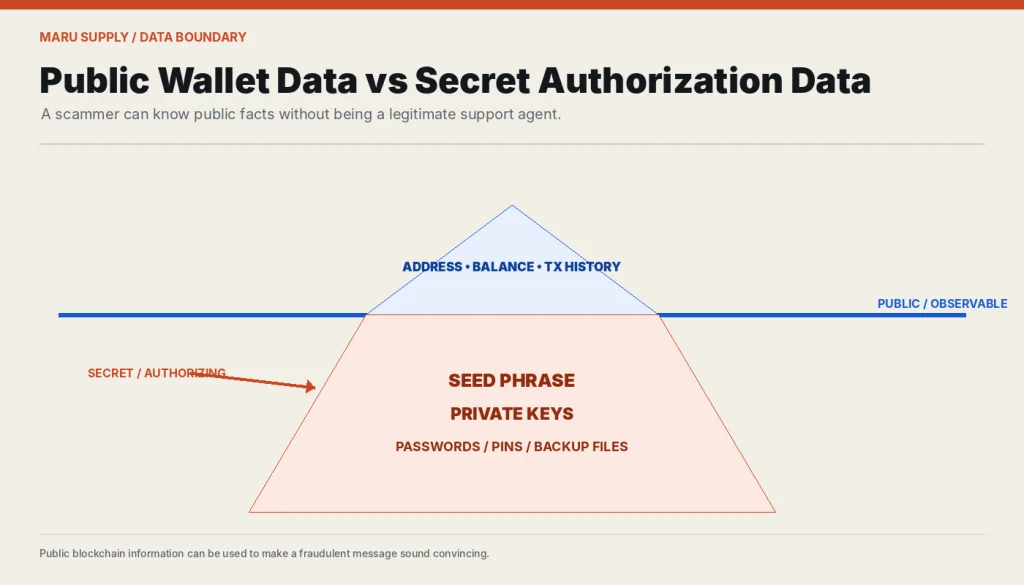
Is a message safe if it knows my address or balance?
No. Addresses and balances may be publicly visible on a blockchain. Knowledge of public data does not prove that the sender is legitimate.
Can deleting the phishing app secure the old wallet?
Deleting the app can remove one malicious component, but it cannot make an exposed seed private again. Move assets to a new wallet.